Thursday, February 23, 2012

sneakpeeq

sneakpeeqI think I've fallen in love with technology once again!  I came across this absolutely fantastic site the other day called sneakpeeq where every day they have new products and suggestions for you to "peeq" at.  Every time you peeq to flip a price tag and reveal their (seriously) scandalously low prices – you earn rewards!  You also get surprises as you peeq – but you have to peeq to win!!!'

Definitely worth a few minutes of your time every day – and just so you know – there are all manner of goodies available!  This isn't a site dedicated to just one particular item like clothing or technology – you never know WHAT is going to be posted from day to day!!!  There are several sections – Living, Style, Taste, and Exclusives – and they change daily so be sure to check them out!!

You can also find sneakpeeq on Facebook (and peek right from Facebook too!) as well as Twitter...so what are you doing still sitting here reading?!?  Go do some sneakpeeq-ing people!  You'll be crazy glad you did!


Wednesday, February 22, 2012

Momma's Ramblings

Today's been a rough day for me for some reason.  Might have something to do with the late nights to bed the past few days, or the fact that my Man Thing is having health issues and is just too damn STUBBORN to carry his ass to the emergency room like I have told him, like his cardiologist has told him, like his primary care physician has told him.  His favorite response to that is, "I have work to do," to which I reply, "Well you won't be able to do it when you're DEAD either jackass!" 

Sigh.  He's a man....need I say more?

J. has been thoroughly enjoying his *vacation* from school with the Man Thing giving him back his XBox and his computer so he's not *bored* while he's home on suspension for ten days.  Um, that's the whole POINT of suspension – a *punishment* for something you did wrong.  Well homework came home today for him – and I'm picking his textbooks up at school from his locker tomorrow....vacation is O-V-E-R because there will also be some "momma assigned" reading homework to be done as well.  Checked on his grades today and he's failing EVERYTHING but one class for the 3rd Quarter.  Not good.  Not ACCEPTABLE – especially when I know he can do the work and he's just refusing to do it on principle for whatever reason.

I've also been tossing about the idea of trying to find something on a full-time basis that I can do from home.  Due to my own health issues – it would need to be something that I can do from home for the next six to 12 months though until I can get MY issues dealt with – then I can return to the 'normal' workforce if I so desire.  I'm also going to be getting my driver license back.  It's been long enough that I've been without it, and I miss driving and being able to go where I want whenever I want.  Heaven knows that I don't want anything at all to happen to the Man Thing – but I need to be sure that I am able to take care of myself and my children in the event something should happen and he's no longer able to work – so I'm tossing about ideas there as well.

The future is up in the air at the moment – on lots of fronts – so I think rather than try to deal with them all any longer, I'm going to just say adieu and call it a night. 

Welcome Wednesday Hosted by Take It From Me

Welcome Wednesday is now open ALL week and will start NEW every Wednesday!   The blog hop is hosted by Take It From Me, Happy Hour Projects, and Let's Move It Mommas!  Welcome Wednesday is a great way to meet new people and learn new things, as well as increase your blog followers LOL!

WelcomeWednesday

To be a part of the Welcome Wednesday festivities – just follow these 5 simple steps:

1.  Follow us via Google Friend Connect, Google+, Linky Followers, Facebook, Twitter, as well as checking out the Spotlighted Blog of the Week!

2.  Link up your blog name and URL with the Linky below.  ( You only need to add your information once, it will be seen on all the blogs that are participating )

3.  Grab our Welcome Wednesday button and include it in a post about the event on your blog.

4.  Go to as many blogs on the McLinky list below as you can/want and follow them.  Be sure to tell them you are from Welcome Wednesday!!

5.  Be sure to follow back any new followers you have gained from the Welcome Wednesday event!

Without further adieu, this week's spotlight blog is:

Sarah from Alderberry Hill writes:  "I am a crafting Momma who has the best family and a great husband. Life is hectic, real hectic. Between work & home life, there's barely any me time but I always make time for creating and sharing with all of you. It's a fabulous hobby and I enjoy it to the fullest. At Alderberry Hill I hope you'll find something to inspire you to create as well."

What's neat about our Blog Hop:

-Put the same linky list code on your blog and you'll have the exact same list!

- Your blog visitors can add their blog to your list and it will show up on Everyone's lists!

- By adding your blog YOU MAY BE RANDOMLY CHOSEN FOR OUR BLOG SPOTLIGHT OF THE WEEK!!!

Don't forget to leave a comment below if you are new to the blog hop or a new follower so we can follow you back and get ready to have some fun!!!

Monday, February 20, 2012

How to Share Your Incredimail Letters on Your Blog

I have had several people ask me how to go about sharing their Incredimail letters that they create on their blog for others to snag as well that are not part of the Yahoo and Google groups that they share them in, so I decided to whip up this tutorial for you and make it nice and simple!

You need a file cabinet on Google Sites to upload your files to.  (The reason I suggest Google sites versus 4Shared is that you do not have to wait for the download, and the people saving your letters do not have to click on several different links or wait to receive the letters – makes for happy downloaders who will continue to come back to your site because you've made it easy to receive your letters!)

Go to www.google.com and sign in (if you do not have a Google account, make one).  Once you are signed in you will see the following bar across the top of your browser:
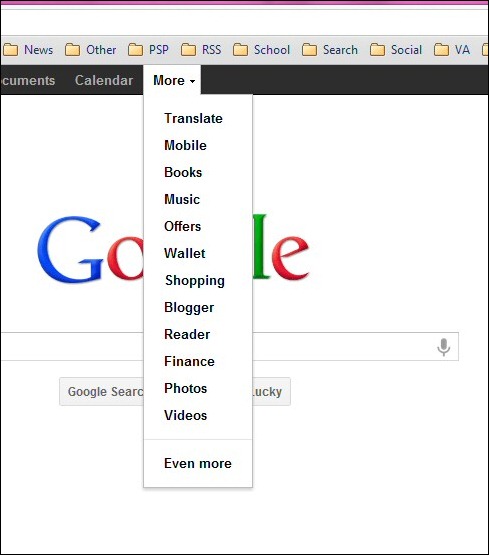
Image1

Click on More and then click on Even more at the bottom of the drop down menu.

Image2

Scroll down to the Home and Office section and click on Sites and when the page opens you want to click on the CREATE button as shown below:

Image3

You then need to create your home page – don't worry – it's very simple!  Just select the Blank template and then name your site (I suggest something short) and then click on CREATE when you have finished naming your home page:

Image4

You will now be taken to your home page for your site as shown below (I had to change my name from IM letters to my letter creations hence the different names) and your site should show up like mine below:
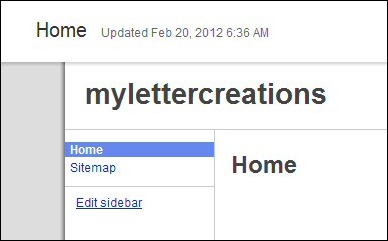
Image5

On your new home page – look to the right of your screen and you will see the NEW PAGE option – click on this to create your file cabinet to store your letters and wallpapers and whatever else you would like to share on your blog:

Image6

When you select the New page option – you will have the following screen appear.  You need to fill in the name of your page (I suggest files) and then scroll down to "Select a template to use" and be sure you choose the "File Cabinet" option.  Then just click Create and your file cabinet will now be available!

Image7

Google will automatically load your Files page for you which will look like this.

Image8

Now you can begin uploading your IMF files to share on your blog.  To do so all you need to do is click on the Add file button as shown above, select the IMF file from your computer and you are finished!  You will now see your IMF file uploaded to the files section as shown below.

Image9

Now we are going to show you how to share your IMF file using Blogger.  Open a new window in your browser (you need to keep your file cabinet open in another window to access your files) and log in to your blog on Blogger and click on the New Post button to create a new blog post.  Insert the Title you wish to use for the blog post and you can begin with your text about your post.  We will then add the preview you created in letter creator (see my Letter Creator IMF Preview Tutorial) by clicking on the image link as shown below:

Image10

You will see the following screen appear giving you an option to choose a file to upload or to add a link to a preview already online.  I suggest just uploading your preview and allowing Blogger to host the image (it is much simpler to do so this way than to upload and link from a photo sharing site such as Photobucket or Fotki).  Once you see the preview on your screen with the blue box around it, click on Add Selected so that it will add that particular image to your blog post as shown below:
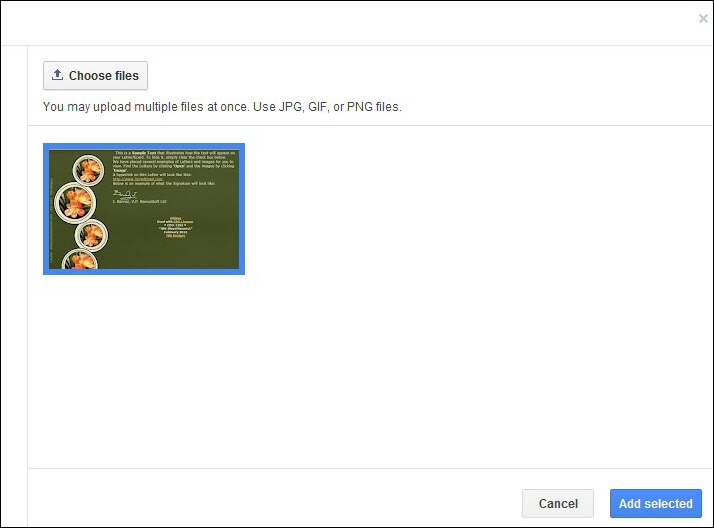
Image11

Your image will automatically be inserted as a small size – once it is inserted you will have the option to choose small medium large or original for your preview size.  Use whatever size works best for you and does not overlap your blog post margins and bleed into your sideborder area of your blog.

Image12

Once you have adjusted the size of your preview, click the image once and then click on the link selection in your blog post bar.  Switch over to your file cabinet and right click on the download link for your IMF letter, and then go back to your blog post window and paste it into the Web address field as shown below:
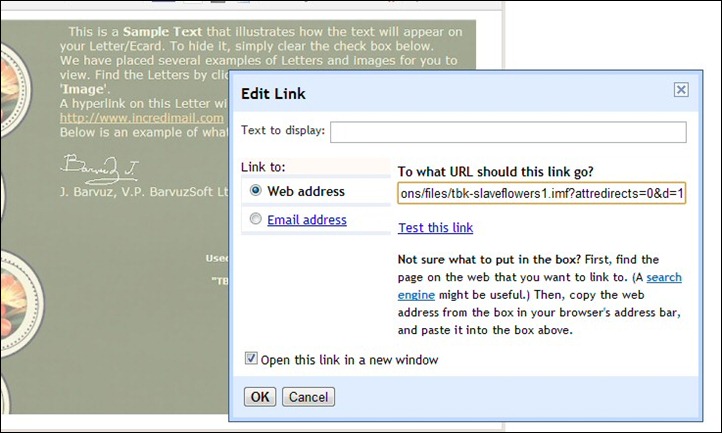
Image13

The nice feature of using Google Sites to host your IMF files is that the file will automatically download when clicked so there is no need to open the link in a new window (although you can leave this box checked if you wish to do so).  Once you have inserted your link, click on the OK button and your IMF letter download is now attached to the preview!

All you need to do is instruct your readers to click on the image to download the file, add your labels, and publish!

This tutorial is of my own design and creation and copyrighted to ©Kimberly Miller.  Any similarity to any other tutorial is purely coincidental.  If you wish to share this tutorial with others, please only share the link to this tutorial in your Yahoo/Google groups and direct others to my blog to view the tutorial post.  Thank you!

Letter Creator IMF Preview Tutorial

This is a tutorial designed to assist those who create Incredimail stationery in creating a preview of your letters to share on your blogs or web sites to enable others to download your letters.

Very simple tutorial, and only takes a few steps.  Put your letter together in Letter Creator as you normally would and add it to your Incredimail files.  Before closing your letter creator screen; however, adjust the image preview on your screen so that a majority of the image can be seen as well as the text and/or footer section of your letter.

Your next step is to hit your Prt Scr key on your keyboard (Print Screen) to take a snapshot of your screen and then paste that image into Paintshop Pro or whatever imaging program you are using.  We are now going to crop that screenshot image as shown below:

Image14

You need to crop just the image area that you want to share.  Do not worry about trying to get the entire letter (especially if you have a header and sideborder area) in the cropped area – this is just a preview of the letter to give your readers an overview of what the completed letter looks like.  Once you have this area cropped, just double click on the image and it will delete the areas that are outside the cropped area. 

I suggest that when you save your preview you give it the same name as your IMF letter so that they are grouped together on your hard drive and easy to find both the letter and the preview.

You are now ready to move on to the next tutorial – How to Share Your Incredimail Letters on Your Blog.


Thursday, February 16, 2012

Welcome Wednesday!


Join me in participating in the Welcome Wednesday blog hop that is hosted by Take It From Me each week.  Below you will find a linky list of participating blogs.  If you would like to participate as well, just follow these 5 simple steps:

1.  Follow us via Google Friend Connect, Google+, LinkyFollowers, Facebook or Twitter as well as the Spotlighted Blog of the Week!
2.  Link up your blog name and URL with the Linky below.  You only need to add your info once for it to be seen on ALL the blog hop posts!
3.  Grab our Welcome Wednesday button and include it in a post about the event on your blog.
4.  Go to as many blogs on the McLinky as you want and Follow them.  Be sure th tell them you are from Welcome Wednesday!
5.  Be sure to follow back any followers you have gained from our Welcome Wednesday event!


------This Weeks Blog Spotlight----
Tiffani from Thoughts from Tiffani writes: "Hello all! My name is Tiffani and I am the driving force behind Thoughts from Tiffani.  It is where I come to rant and rave about my family, friends, and life in general. Most of my thoughts are random and occasionally they will include crafting, work, diet, exercise (or lack thereof), and fashion."

What's neat about our Blog Hop:
-Put the same linky list code on your blog and you'll have the exact same list!
- Your blog visitors can add their blog to your list and it will show up on EVERYONE'S lists!
**Leave a comment with your blog address if you are new to our hop so we can follow you back**


Wednesday, February 15, 2012

New Look for LIAH!

I finally got my tail in gear and got the new look for Life in a House of Testosterone finished today!  Unfortunately, my IntenseDebate comments just disappeared and I don't really want to reinstall it as Blogger now has the same format that allows you to reply to comments made on the blog – so there is no reason for me to have it.  IntenseDebate, however, is revamping their comment import/export service so no idea when I will be able to get the older comments imported back into the blog – but they have been downloaded so that I can as soon as its available again.

I've been a busy gal with some great new artists from Artistic Dreams Imaging which I'll be showing off later on.  At the moment, we're headed out the door to take my poor little man, T., to see the doctor again.  His ear infection is apparently back in full force and he's been crying all day long off and on.  So hopefully Dr. C. can get him fixed up and rolling again, bless his heart.  I know how that feels – not fun.

Be back a bit later with some new creative genius from yours truly and an update on what's been going on in my neck of the woods!

Tuesday, February 14, 2012

It's Chainsaw Time!

Do you sleep with someone who snores?  Are you the individual doing the snoring?  Do people tell you that you sound like a chainsaw when you snore?  Are you banished to the living room couch, or does your partner leave and sleep on the couch just to get away from the noise?  Do you constantly get woken up due to your partner yelling at you to roll over, or jabbing you in the ribs to wake you up and make you change positions?

Yeah.  Me too.  I'm the chainsaw in my household.

It is something that apparently runs in my family – on my maternal side of the family at that.  My mother used to snore unmercifully.  It was so bad, that my brother and I would sneak into mom and dad's room at night and we would sometimes pinch her nose closed until she stopped and rolled over.  Dad, on the other hand, slept like the dead – nothing woke him up – ever.

The Man Thing and I will celebrate 18 years together in June.  Hopefully.  The way things have been going lately though – I don't know if we'll make it that long if I don't do something – quick – to stop the snoring.  I've been spending my nights on the living room couch for about the past three months now because of my snoring because my man thing has been having some health issues of his own and needs his rest.

So this morning, by the simple grace of God, I saw the infomercial about ZQuiet again.  It is the one product that I have seen that has been cleared by the FDA – which means not only is the material safe – but also that the product achieves its intended purpose.  I've tried other solutions, the sprays and the breathing strips, and they don't work.  I've looked into pillows and chinstraps.  ZQuiet is the only product I have seen that gently advances the lower jaw to create a widened airspace in the back of the throat – where the loud snoring noise is caused due to the vibration of the soft tissue surrounding the airspace.

The company is so sure that it will alleviate any snoring, they offer you a 30 day trial of ZQuiet for just $9.95.  If you do not return the ZQuiet within 45 days of receipt, then your credit card is charged the remaining $59.95 and it is yours.  While I think it is a bit pricy, it is a small price to pay for peace and harmony within my household – not to mention a good night's sleep for a change!

So dear readers, my order goes in tomorrow morning...and I will be giving a complete and honest review right here on the product once I receive it!